Product spotlight
Request list import from Excel
By the CogniSuite team
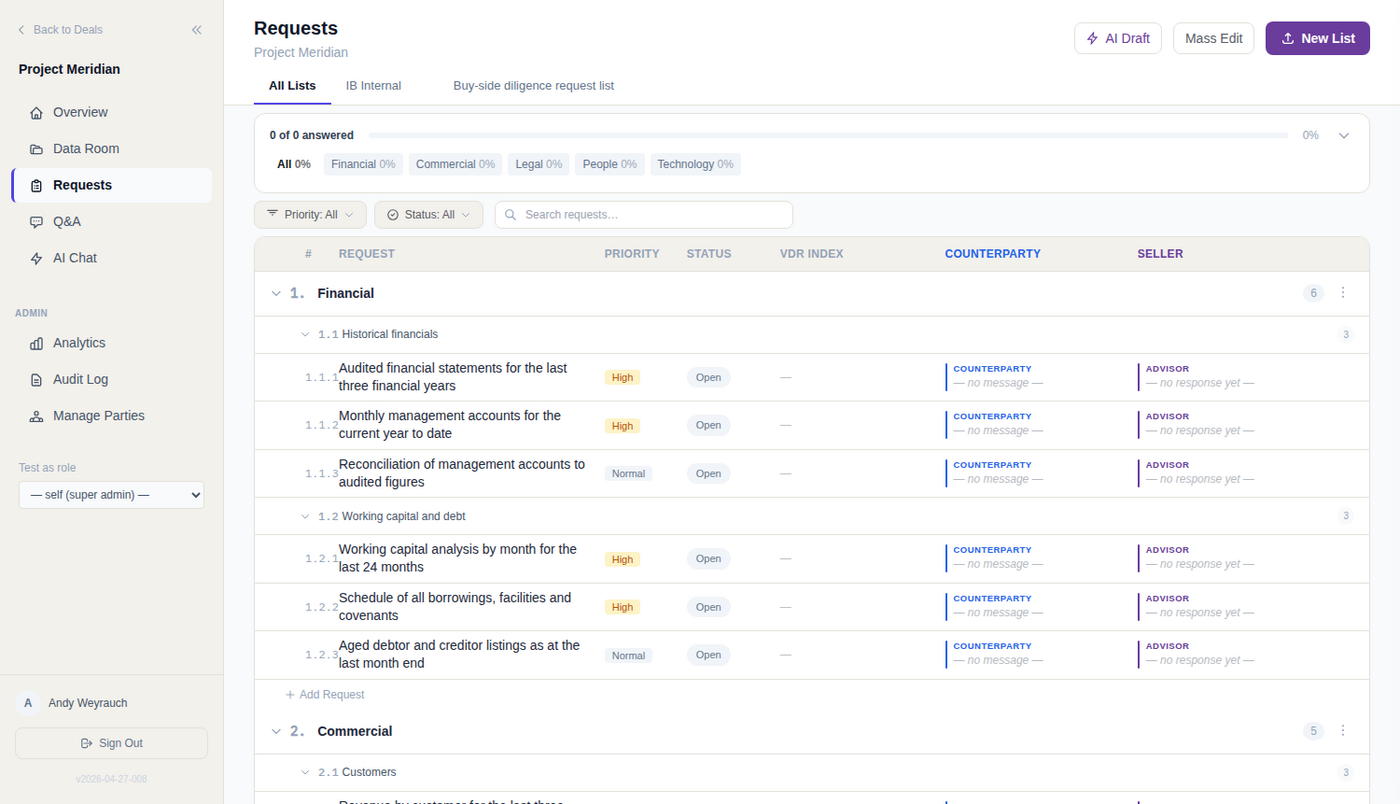
Now live in CogniVault: request-list import that never retypes your text. Upload the client’s Excel checklist, whatever its layout, and get a working request list: categories, topics, and every request exactly as written. The AI reads the layout. Ordinary code copies the cells. Not one word is paraphrased.
What you get
- Any reasonable layout. Category on every row, sparse category rows, one tab per workstream. Cover sheets and summary tabs are recognised and ignored.
- Preview before anything exists. You see the parsed structure and the column mapping first. Nothing is created until you confirm.
- Fails loudly. A layout it cannot read returns an error, not an empty or invented list, and the parse counts itself against the rows in your file.
- Live on confirm. Requests become assignable, trackable, and scored automatically against every new upload.
The difference
A model asked to transcribe 140 requests can drop one or reword another, and neither failure announces itself. CogniVault’s model never touches your text: it returns a reading plan from a closed vocabulary, code executes that plan against the raw cells, and that failure class disappears. Your list and the client’s copy read the same, to the word.
Technical view How it works in detail, and where it stops
What the import does
Upload the client's Excel diligence checklist and you get a working request list in one step: categories, topics beneath them, the individual requests. The model never retypes a word of it.
- Nothing is reworded. The request text in your list is the cell from the workbook, trimmed and otherwise untouched, so your list and the client's copy read the same.
- Preview before anything exists. You see the parsed structure and the column mapping used. No entries are created; the workbook is not filed into the data room.
- Live on confirm. The items become real requests: assignable, trackable, scored automatically against uploaded files.
The model plans, the code reads
What does the model see? A compact rendering of the workbook: every non-empty row of every tab, column letters attached, cells truncated to a short prefix, up to a fixed row cap per tab. Cell text does reach the model. This is a layout sample, not a redacted one.
What may it send back? A reading plan, and nothing else. It names which tabs hold requests, with a header row and a data start row for each. For each field (category, title, description, priority, folder hint) it returns a column index plus one mode from a closed vocabulary of five: read the column value, treat a repeated column value as the category, take the category from a sparse category row or from the sheet name, or leave it unset.
Who writes the request text? Ordinary code, executing that plan against the raw cells. The description in your list is the full cell value, trimmed. Truncation applies only to the sample the model saw.
Why build it that way? A model asked to transcribe 140 requests can drop one or reword another, and neither failure announces itself. Because the model never touches your text, that failure class does not exist. A wrong plan is visibly wrong: the wrong column, or zero requests, never a list that looks right but differs from your file.
And a hostile cell? A tracker written by another firm is untrusted input, and the closed vocabulary is the boundary. An unrecognised mode is rejected outright rather than interpreted, as is a negative column index. The worst free text can do is influence which column gets read, and the preview shows that.
Layouts it handles
Diligence questionnaires arrive in structurally different shapes. One plan covers them:
- Category repeated on every row. A change in that value starts a new category.
- Categories on sparse rows of their own. Sparseness is confirmed before it is believed: almost every cell other than the ordinal and the name must be empty.
- One tab per workstream. The tab name becomes the category, and the same name on several tabs merges instead of duplicating.
- Cover, instruction and summary tabs. Ignored. A summary tab parsed as a request list gives a short, confident, wrong import, so the plan lists only the tabs holding requests.
- Inline numbering stripped. "1. Corporate Matters" becomes "Corporate Matters". "10-K" stays a filing, because the ordinal test requires a separator after the digits.
When it refuses rather than guesses
An invalid plan fails loudly. You get an error, not an empty list, when:
- no mode is recognised,
- no tab is identified as holding requests,
- no request text column can be found,
- or the parse yields zero requests. An empty success is indistinguishable from a checklist with no items.
Rows appearing before any category is established land in an explicit Uncategorized category rather than being dropped. The parse also counts itself: rows mapped against rows seen, checked against the model's own expected counts, flagging a deviation over twenty percent either way.
Where it stops
- Counts are server side, the check is yours. Coverage warnings come back with the parse and go to the log, but the import screen shows no banner. Count the preview against the file before you confirm.
- Topic splitting is a judgement call. With no separate topic column, every request becomes its own topic.
- Excel only. A PDF or CSV checklist is not this path. If your file builds request text out of other cells, paste that column as values first.
- The model call is a real dependency. If schema detection fails or times out, the import fails. Nothing else guesses a layout.
- It reduces what the model produces, not what it reads. If no cell of a confidential tracker may ever reach a model, file the checklist by hand. See the security page.
- Deduplication is separate. Matching against request lists already in the deal is an explicitly triggered step.
See it on your own deal.
General information, not legal, tax or financial advice. For how CogniVault handles security and access, see Security.