Product spotlight
The AI drafts the answer. Your team hits send.
By the CogniSuite team
Now live in CogniVault: the request list drafts its own answers. Point the AI at a diligence request and you get a written response with the supporting quotes attached, each quote checked against the source document before it reaches your screen. Most data rooms match a request to a folder and call it done. On a list of several hundred requests, the writing is the work, and CogniVault does the writing.
What you get
- A written answer, not a pile of hits. Prose addressed to the counterparty: whether the material is in the room in full, in part or not at all, and what is missing.
- Quotes you can click. Every citation carries the verbatim text and opens the source document at that passage.
- A verdict on every request. Answered, partly answered or not answered by what is in the room, with the gaps listed.
- Your team stays in charge. Nothing goes to the other side until a person approves, edits or replaces it.
The difference
The quotes are checked, not trusted. Before a draft renders, the server confirms that every cited document is one the reader may see and that every quoted sentence exists in it, word for word. A citation that fails is dropped, and a draft left with no surviving evidence is pulled for manual review. A chat box bolted onto a file server does not do that.
An answer already approved elsewhere in the deal can be carried across instead of written again, so four bidders asking the same question cost your team one review.
Technical view How it works in detail, and where it stops
What the AI drafts for you
CogniVault writes the answer to a diligence request as prose, quotes the supporting language, and links each quote to the exact place in the source document. Matching alone hands you a folder; on a list of several hundred requests, the writing is the work.
Every draft carries:
- A verdict. Answered in full, in part, or not at all by what is in the room, with the gaps listed.
- Quoted evidence. Each citation carries verbatim text and links to that passage in the document.
Drafts stay with the deal team. Nothing goes back until a person approves, edits, or replaces it. The same path runs on the private Q&A board.
How every quote is verified
Every citation is checked against the real document text before the draft reaches your screen. The model never writes free text into the answer field: it returns a structured object through a forced tool call, and each citation must clear three gates:
- In scope. The named document must resolve to one inside the permitted set for that draft.
- Actually present. The quote must occur in that document's extracted text, matched with whitespace normalised and a fallback for PDF and spreadsheet spacing artefacts.
- Actually used. The phrase the citation supports must appear in the answer, so a citation cannot back a claim the answer never made.
Failed citations are dropped. If a draft claims the request is answered in full and none survives, the answer is thrown away and the request is routed for manual review. What survives gets flagged for material non public language and for money figures the quotes do not support. Flags never block; they tell a reviewer where to look.
Retrieval runs through one shared code path filtered by the same per-folder permissions as the file tree, before ranking. For an answer going to the other side, a folder is admitted only if every counterparty organisation that can see the request list may read it. Intersection, not union.
Category, topic, request
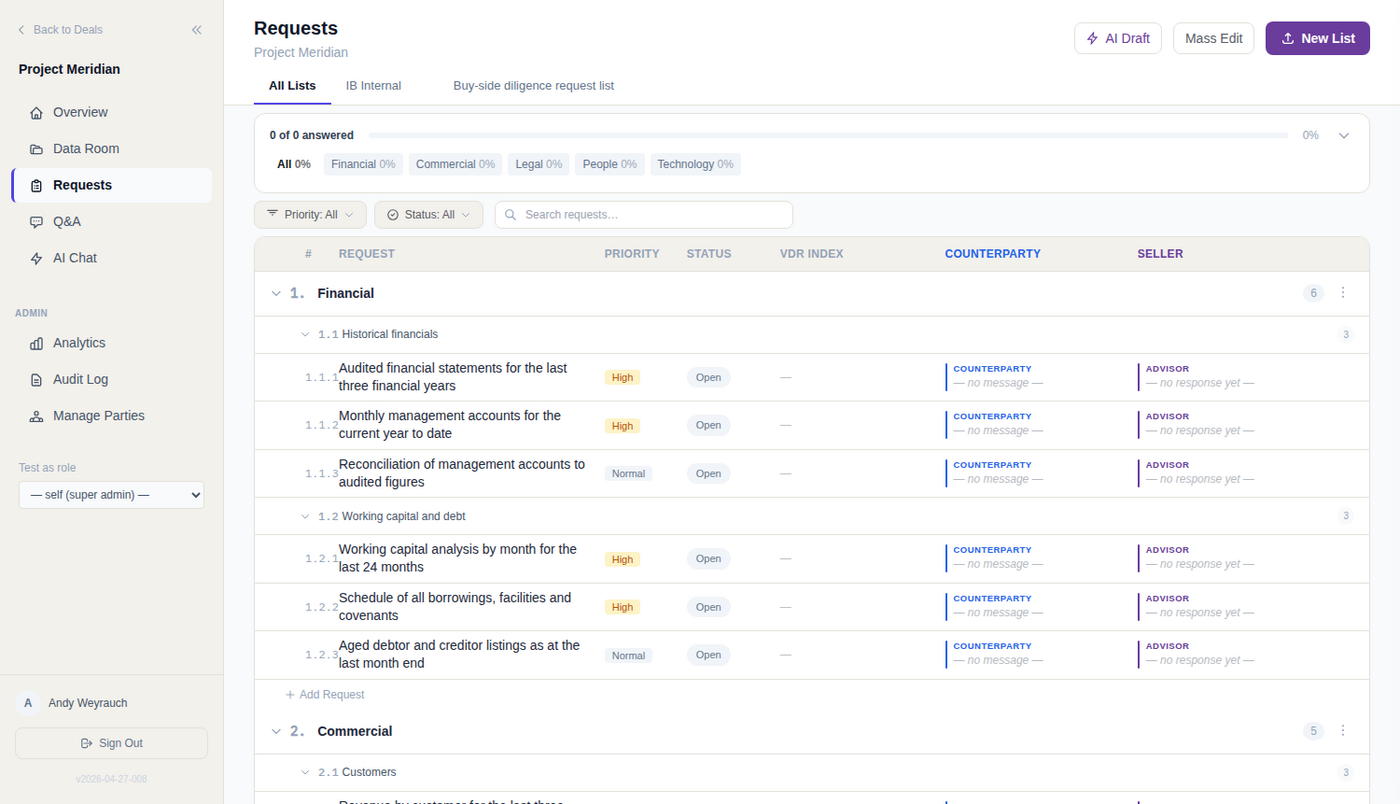
The request list has exactly three levels.
- Category. The top level, such as Financial or Legal.
- Topic. A grouping inside a category.
- Request. The unit that gets answered. It carries an owner, a status, and links to answering documents, each proposed by the system or confirmed by a person.
Build a list three ways: describe the deal in prose and get a draft list plus a matching folder tree, start from a template, or import a spreadsheet.
The importer never asks the model to transcribe your spreadsheet. It reads the rows and returns a reading plan: which tabs hold requests, and where each field comes from. The app runs that plan against the raw cells, so nothing is paraphrased or invented. Bad plans fail loudly.
How a request gets matched
1. One index. Request wording and document text share one embedding space, so a request scores against every file and every other request.
2. Your team triggers the scan. One request, or the whole deal.
3. Pairs above the bar become proposals, hidden from buy side users until reviewed.
4. A person decides. Approve in full and the earlier request's confirmed answer documents are copied across. Approve in part and a written gap description is required. Or dismiss it. Buy side users can dispute a merge.
5. It runs the other way too. An uploaded file is scored against open requests and its best match is recorded as a proposed answer whatever the score, so nothing gets dropped. Bulk matching previews before it writes.
The bar is permissive on purpose. Audited financials for three years and for five sit close together in any embedding space and differ in a way that matters. Inheriting an answer is also a disclosure call, so a confirmed link records who approved it.
Where this stops
- One vector per document, built from truncated text, so a long agreement is represented mainly by its opening and the index cannot point at a clause inside it.
- Enrichment runs in the background. A file whose text extraction failed carries no vector and stays invisible until reprocessed. Scanned PDFs are the usual case.
- Q&A dedup is keyword based, grouping open threads by shared keywords. It never compares a question against answers already on the board.
- Model guardrails are prompt level. The real boundaries are the per deal database, the permission check, and the quote verification. No output classifier, no second model.
- No figure reconciliation. Nothing compares numbers across documents, so conflicting figures are still your team's catch.
More on the access model behind this is on our security page.
See it on your own deal.
General information, not legal, tax or financial advice. For how CogniVault handles security and access, see Security.