Product spotlight
Deal-side aware permissions
By the CogniSuite team
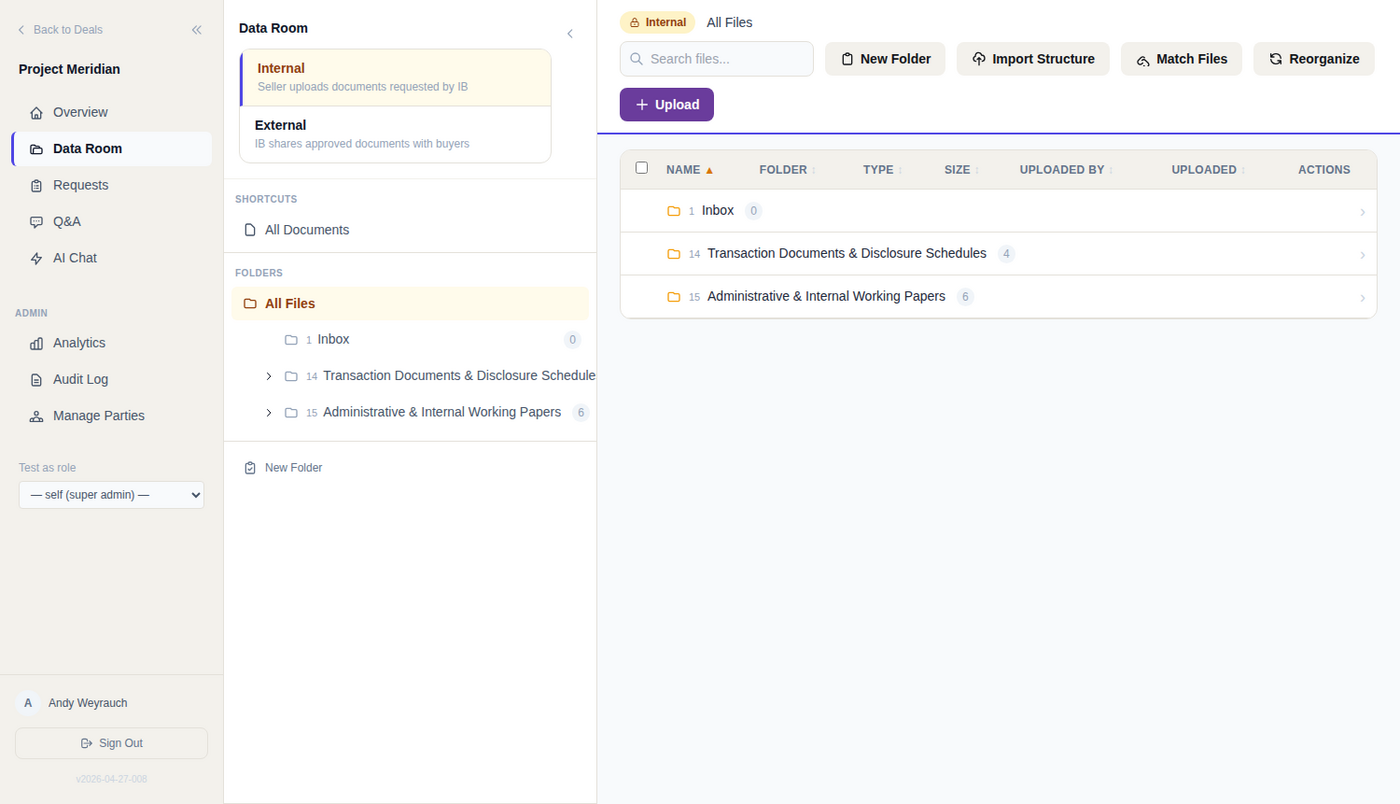
Now live in CogniVault: deal-side aware permissions. Tell the room the mandate is buy-side and it works out that the seller is the outside party. Sell-side, and the buyers are. Either way the counterparty’s default access to internal folders is none, with no access matrix built by hand. Most data rooms were designed for one side of the table and leave the other side to configuration.
What you get
- No hand-built access matrix. The deal side sets the baseline every unconfigured folder resolves to, which is most of a working room.
- Failure lands on the safe side. A missing or unreadable deal type resolves to sell-side, and an unlabelled folder resolves to internal.
- One bidder, one folder. A folder scoped to a named organisation is readable by that organisation alone, not by every bidder in the room. That is what makes clean-team folders work.
- Blocked folders keep their names to themselves. The tree listing and the file gate run the same rule, so a folder a party cannot read never appears in their tree.
The difference
A folder name alone can disclose a bidder’s identity or a dispute, which is why the tree and the access check cannot disagree in CogniVault. And the default is a default, not a wall: an explicit grant still opens one named internal folder to the other side for a limited disclosure, without weakening anything else.
Technical view How it works in detail, and where it stops
What deal-side awareness does
Deal-side aware permissions lock the counterparty out of the internal room on either kind of mandate, with no access matrix built by hand. Tell CogniVault the mandate is buy-side and the room works out that the seller is the outside party.
- Sell-side: the bank and its seller client share the internal room, buyers are external.
- Buy-side: the bank and its buyer client share the internal room, the seller is external.
- Either way: the counterparty's default access to internal folders is none, and access exists only where your team granted it.
A hand-built grant table records the conclusion and loses the reason, so the folder someone creates next week inherits the org-wide ceiling instead. Deal side sets the baseline every unconfigured folder resolves to, which is most of a working room.
How the room decides who is external
The room reads the deal type from the deal's own record and treats it as buy-side only on an exact match. Missing, unknown or unreadable returns sell-side, so a read failure degrades to the safer shape.
From that one value:
- The internal client is derived: the buyer on a buy-side deal, the seller otherwise.
- A folder counts as internal by walking up to the nearest ancestor that sets a visibility label, failing closed to internal if none resolves.
- The tree listing and the file gate call the same default rule, so a blocked folder never appears in the counterparty's tree. A second implementation of the rule is free to omit a check, and a folder name alone can disclose a bidder's identity or a dispute.
It is a default, not an absolute block. An explicit folder grant from the deal team applies on top and wins, so you can open one internal folder to the other side without weakening anything else.
Scoping a folder to one bidder
Folders carry one of four visibility labels: internal, external, all buyers, or specific. A specific folder names one organization and is readable by that organization alone, not by every bidder in the room.
The lookup returns a target organization only when the nearest ancestor setting any visibility value is set to specific. Meet any other value first and it returns nothing, so a specific grandparent under an external parent cannot narrow that subtree or push its scope past a folder that already declared itself open.
The standard M&A tree the room builds for a new deal tags restricted categories as internal with a clean-team marker rather than specific, because a specific folder needs a target organization and that organization does not exist when the deal is created. Point it at the clean team once they are a party.
Reading and exporting, decided separately
What does view-only actually block? Folder access resolves to full, watermark, view or none, plus a separate upload permission. A view folder is readable in the browser viewer and cannot be downloaded or exported. The attachment download and the inline native stream that renders spreadsheets and Word files on the client are refused by one shared condition: org download none, folder none, or folder view.
What happens on a bulk ZIP? The check repeats for every file in the archive. A ZIP spans folders with different access levels, so one answer for the whole request cannot be right for all of them. Anything the viewer cannot export is left out.
Who wins on watermarking, the folder or the organization? Stored files are always clean originals; the mark (viewer name, organization, UTC timestamp, CONFIDENTIAL) is burned in at serve time. The handler starts from the organization-wide download setting, then applies any explicit folder grant found up the tree. Only an explicit grant overrides, and it overrides both ways: explicit full yields a clean copy under a watermarked policy, explicit watermark forces a mark under a clean one. Same resolution on preview, on the Office-to-PDF rendition, and per file inside a ZIP.
Where this stops
- Marking covers PDF, Word, common image formats, Excel and PowerPoint. Excel carries a header on every worksheet, PowerPoint a line on every slide. A format with no marking support is refused on the download path and skipped inside a bulk ZIP, so a watermark policy is never satisfied by handing over the clean original.
- Watermarks are visible, not forensic. There is no invisible per-recipient marking, and the Word mark is a document header a determined recipient can strip.
- The default posture is open. A new organization defaults to full download, so a room where nobody sets folder rules stays open. Set your policy if it is restrictive.
- AI retrieval admits view and watermark folders. An answer can quote a document the asker may only view, so treat view-only as an export boundary rather than a confidentiality boundary.
- The audit log is an oversight tool for the bank. It is readable and exportable by bank roles only, and it is not cryptographically tamper-evident. Source addresses are captured on a small number of event types, so attribution is to an account rather than to a device.
More on how the room is protected: /security.
See it on your own deal.
General information, not legal, tax or financial advice. For how CogniVault handles security and access, see Security.